Client projects require rapidity, conciseness, and uniformity. Freelancers who collaborate with startups, small corporations, creators, or professional service providers are obliged to prepare properly formatted material and bright brand resources so that their customers are satisfied. The scripts should express the messages clearly, and the logos should be used to graphically express the identity of the client on platforms.
The CapCut is also an AI-based creative platform that assists freelancers in handling these requirements effectively. Using the AI-powered CapCut Desktop, freelancers will be able to create scripting content and produce professional logos without using numerous software solutions. These processes save manual labor, accelerate delivery, and simplify the revising process on the projects of the clients.
CapCut as an AI-Powered Creative Platform
CapCut allows freelancers to conduct their work with clients in a more productive way, providing AI-driven capabilities to create a piece of content and to brand it. These tools assist in quick and steady delivery, and it becomes easier to handle the revisions and deliver professional output each time.
CapCut AI Writer (Desktop)
Benefits for Freelancers
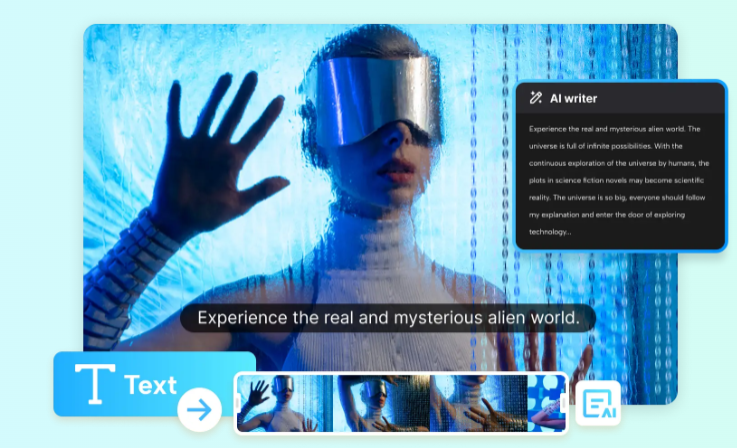
Scriptwriting is a repetitive activity in customer work. Explainer videos, promotional content, onboarding documents, or instructional scripts are commonly created by freelancers on the basis of the client’s brief. The AI writer of CapCut simplifies this task by converting basic ideas into organized client-ready scripts.
This tool helps freelancers:
- Write client video scripts, presentations, and marketing scripts.
- Prepare the key notes of the structure in a clear and understandable manner for various audiences.
- Tone and length can be varied according to client needs.
Full Workflow Using CapCut AI Writer
Step 1: Open the AI video maker
- Open CapCut and choose the “AI video maker” option on the main interface.
- Select the option of “Brainstorm with AI” to come up with content ideas in the client project.
Step 2: Brainstorm content ideas
- Enter a project-related idea, such as a video script product overview.
- The AI provides you with a list of pertinent issues based on your input.
- You will be able to pick (pin icon) the most appropriate ideas or explore to find more recommendations.
- When the topics are settled, they automatically get converted to structured points. Click “Generate script.”
Step 3: Generate and customize your client script
- Having chosen an issue, the AI creates a script for the entire client project.
- A customization window will come and you can change the duration according to the needs of the client.
- Add instructions in the field More requirements, Use a professional tone such as, “Keep language simple.”
- Click on the button “Generate”, and create the script.
Step 4: Review and apply the script
- Review the generated script.
- Select “Use” to deploy the script to your client project.
- In case of any necessary changes, either choose “Create again” or Cancel.
CapCut AI Logo Generator (Desktop)
Benefits for Freelancers
One of the most significant outputs of client projects is usually a logo. Brand recognition and professionalism are achieved through having a well-designed logo. The AI Logo Generator of CapCut enables freelancers to create logos in an effective way and stay creative, and have the possibility to make adjustments.
This tool helps freelancers:
- Design client branding, campaigning or service logos.
- Test various visual styles within a short time.
- Create professional logo designs with no complicated design software.
Full Workflow Using CapCut AI Logo Generator
Step 1: Enter text prompt
- Open up a new project in CapCut and go to AI media, AI image.
- Introduce a specific prompt with the description of the logo needed by the client, the industry, brand personality, favorite colors, and the general style.
- To achieve improved results, post a reference image to lead the design.
Step 2: Generate an AI logo
- Select a model of available generation, like: Nano Banana Pro, Seedream 4.0, Seedream 3.0, Seedream 3.1, Flux 1.1 Pro
- Click “Generate.” The AI generates various logo designs according to your requests and chosen model.
Step 3: Edit the logo
- Improve the logo with the editing tools of CapCut.
- Input the name of the brand of the client, change fonts and colors, add icons or stickers, and use visual effects to make sure that it fits the brand standards.
- Such editing functionalities allow for integrating client feedback and completing designs more quickly.
Step 4: Export the logo
- After you are done with the logo design, press the three line menu line above the editing panel.
- Select “Export still frames.”
- Select the resolution and format you want (at most 8K) and press the Export button, and the logo will be downloaded to deliver it to the client.
CapCut Online Photo Editor (Web)
Freelancers can easily be required to create fast visual changes, like changing image sizes, altering layouts, or creating preview resources to give to customers. The online photo editor of CapCut provides an online platform for rapid image editing without the need to install software.
This is the kind of tool that is perfect among people working remotely or in areas that require quick revisions.
Dealing with Client Feedback and Revisions
Feedback by the client is a vital component of a project. The scripts might also need a tone change and the logos might need graphics to be refined. AI-assisted tools enable freelancers to react fast to the input of clients without having to recreate assets manually.
Freelancers are able to:
- Re-generate scripts that have new requirements.
- Result logos effectively on client input.
- Provide updated assets quicker and enhance communication and trust with clients.
As a freelancer, you may be dealing with clients who represent all types of industries and have different brands. It may be hard to stay with the same quality and keep up with the various styles.
Conclusion:
Providing quality scripts and branded material is critical in satisfying the clients. On the one hand, CapCut Desktop offers AI-assisted solutions to freelancers, enabling them to create content and design logos faster and to have high-quality work that meets deadlines and client demands.
Having the additional benefit of fast online image editing, CapCut provides freelancers with a flexible system to complete projects, make revisions, and perform professional output with a sense of stability.