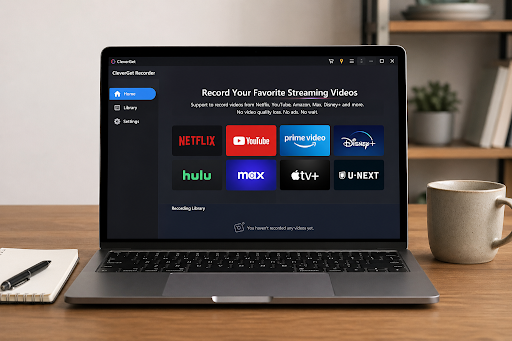
I. What Is CleverGet Recorder?
CleverGet Recorder is a specialized recording tool designed to capture streaming videos that are protected by DRM (Digital Rights Management). These are the types of videos that typical downloaders or basic screen recording tools cannot handle. Many modern streaming platforms utilize DRM to restrict copying, downloading, or screen capturing, making it difficult for users to save content for offline viewing. CleverGet Recorder is built specifically to solve this problem by focusing on reliable capture of protected streams.
Unlike general-purpose screen recorders, CleverGet Recorder is not designed for everyday tasks such as recording meetings, online classes, tutorials, or casual screen activity. Those tasks are better handled by lightweight tools that focus on simplicity and basic recording functions. In contrast, CleverGet Recorder is built for a more advanced purpose: handling encrypted and restricted streaming content that standard tools often fail to record properly.
When to Use CleverGet Recorder
Choosing the right tool depends on the type of content you want to record. CleverGet Recorder should be used when dealing with DRM-restricted streaming videos that cannot be downloaded or captured using normal methods. For example, if a platform blocks downloads or shows a black screen when you try to record, this tool is designed to overcome those limitations.
On the other hand, for routine recording tasks like capturing presentations, tutorials, or desktop activity, a general-purpose tool like Leawo Free Screen Recorder is more suitable. It is simple, lightweight, and effective for everyday screen recording needs without requiring advanced configuration. In short, CleverGet Recorder is for protected streaming content, while Leawo Free Screen Recorder is ideal for basic recording tasks.
II. Why “No Limits”? What Makes CleverGet Recorder Different
To understand why CleverGet Recorder is considered powerful, it is important to first understand DRM (Digital Rights Management). DRM is a security technology used by streaming platforms to prevent unauthorized copying, downloading, or recording of video content. It restricts how users interact with media and is commonly found on premium streaming services, movie platforms, and subscription-based video content.
Because of DRM, most standard screen recorders and browser-based tools fail to capture video properly. Users often experience issues such as black screens, missing audio, or completely blocked recordings. These limitations make it nearly impossible to save protected content using traditional methods.
1. Ability to Record DRM-Protected Streams
One of the key strengths of CleverGet Recorder is its ability to record DRM-protected streams from major platforms. It is specifically designed to handle encrypted video playback environments where normal tools cannot function. This makes it highly useful for users who need access to restricted content for personal viewing purposes.
2. Bypasses Black Screen Issues
A common problem with standard recorders is the black screen issue, where the video does not appear during recording due to protection mechanisms. CleverGet Recorder is built to bypass these restrictions, allowing users to capture both video and audio smoothly without interruptions. This ensures that the final recording remains complete and usable.
3. Supports Full-Length Content Recording
Another important feature is its ability to record full-length videos such as movies, TV episodes, and long streaming sessions. Unlike basic tools that may struggle with long recordings or break files into segments, CleverGet Recorder maintains stability throughout the entire process. This makes it suitable for users who want to save complete content without missing parts.
4. Stability and Reliability
Compared to many browser-based or lightweight recording tools, CleverGet Recorder offers better stability and reliability. Many simple tools tend to crash, lag, or fail when dealing with DRM-protected streams, especially during long recording sessions. CleverGet Recorder is designed to maintain consistent performance, reducing errors and ensuring smoother output.
III. How to Record Videos from Any Website Using CleverGet Recorder
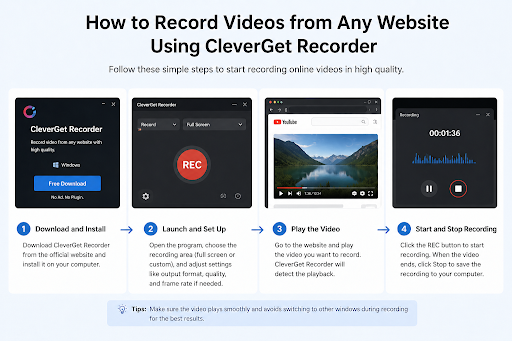
Using CleverGet Recorder is straightforward, even for users who are not familiar with advanced recording tools. The software is designed with a guided workflow that simplifies the entire process of capturing streaming videos, including those protected by DRM restrictions. By following a few basic steps, users can record high-quality videos directly from supported websites and save them locally for offline use.
Step 1: Download and Install CleverGet Recorder
Begin by downloading and installing CleverGet Recorder on your computer. Once downloaded, install the application by following the on-screen instructions. After installation, launch the software to access its main interface and built-in browser.
Step 2: Open the Built-in Browser
CleverGet Recorder includes an integrated browser that allows users to navigate directly to the target website. This eliminates the need to switch between multiple applications or external browsers. Simply enter the website URL where the video is hosted.
Step 3: Play the Target Video
Once you reach the desired page, play the video you want to record. The software automatically prepares to capture the streaming content in real time. This step ensures that the recording process aligns with the video playback for accurate capture.
Step 4: Adjust Recording Settings
Before starting the recording, users can adjust important settings such as video quality, audio input, and output format. These options allow customization based on user preferences, ensuring the final file meets specific requirements. Whether you need high-definition video or optimized file size, the settings can be easily configured.
Step 5: Start Recording and Save the File
After configuring the settings, start the recording process. CleverGet Recorder will capture both video and audio smoothly while the content plays. Once the video ends, stop the recording and save the file locally on your computer for offline access.
IV. Key Benefits and Advantages
CleverGet Recorder offers several advantages that make it a powerful solution for users dealing with restricted or protected streaming content. Unlike traditional tools, it is designed to handle modern DRM-based platforms where standard downloaders often fail.
Works with DRM-Protected Platforms
One of the biggest benefits is its ability to work with DRM-protected websites. Many streaming platforms use strict encryption to prevent downloading or recording. CleverGet Recorder is built to bypass these restrictions, allowing users to capture content that would otherwise be inaccessible using normal tools.
High-Quality Video and Audio Output
The software ensures that both video and audio are recorded in high quality. This is essential for users who want a clear and professional playback experience. Whether recording movies, TV shows, or online streams, the output remains smooth and synchronized.
Simple and User-Friendly Workflow
CleverGet Recorder follows a simple and intuitive workflow that requires minimal setup. Users do not need advanced technical knowledge to operate it. The step-by-step process makes it accessible for beginners while still offering powerful features for advanced users.
Reliable Offline Access to Content
Another major advantage is its ability to provide dependable offline access to restricted content. Users can save videos and watch them anytime without relying on internet connectivity or platform availability. This is especially useful for long-term viewing and content preservation.
Conclusion
CleverGet Recorder is a strong and reliable solution for capturing streaming videos, especially those protected by DRM restrictions. It is specifically designed for situations where traditional downloaders and basic screen recorders fail to work. With its ability to handle encrypted content, deliver high-quality recordings, and maintain stable performance, it stands out as an advanced tool for modern streaming environments.
However, it is important to understand that CleverGet Recorder is not meant for general-purpose recording tasks such as meetings, tutorials, or simple screen capture. Instead, it excels in specialized scenarios where DRM protection blocks standard downloading methods.
For everyday recording needs, users can rely on Leawo Free Screen Recorder, which is better suited for routine tasks like tutorials, presentations, and basic screen recording. Ultimately, choosing the right tool depends on the type of content and user requirements.